Wondering how to prepare artwork for DTF printing? If you’ve ever sent a design to print and then wondered why it came back looking like it survived a toddler’s first day with crayons… don’t stress. DTF printing isn’t complicated. It just needs clean, prepared artwork that plays nicely with the machines.
Think of it like cooking: the printer can make a masterpiece, but only if you hand over proper ingredients. Here’s how to prepare artwork for DTF printing so your prints pop, stretch, and survive Mzansi washing machines without fading into the witness protection programme.
This is How to Prepare Artwork for DTF Printing
1. Start With High-Resolution Artwork
Quality in = quality out. If your image looks fuzzy on your screen, it’ll look even worse on fabric.
Aim for 360 DPI, not 72 DPI, not “I screenshotted it from Instagram”.
Best formats:
- PNG (with transparency)
- PSD
- TIFF
- High-res PDF
- Vector files (AI, SVG, EPS)
Avoid: JPGs compressed more times than a WhatsApp meme.
2. Use the Right Colour Space
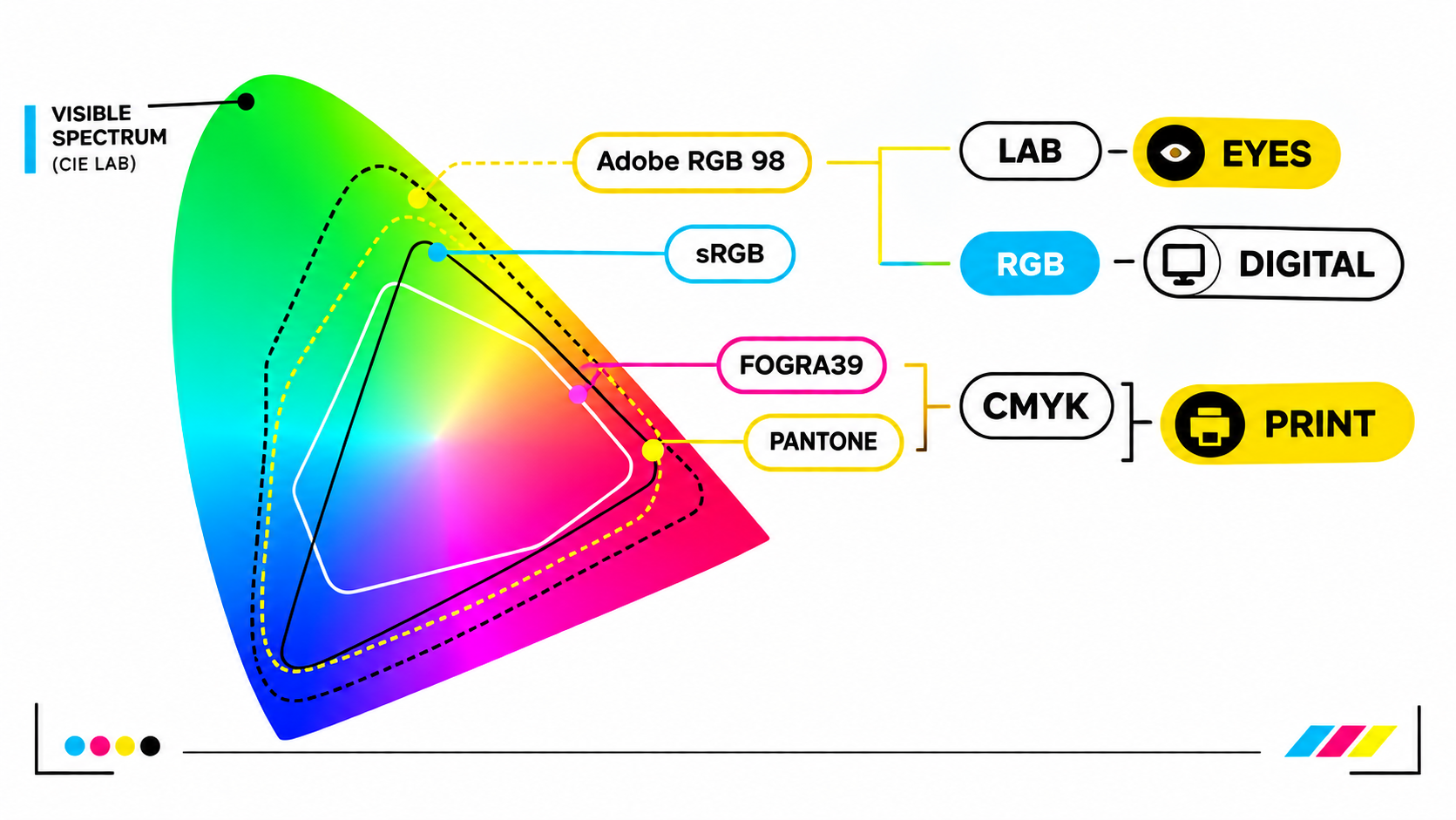
DTF printers love RGB. Design in RGB (Adobe1998), not CMYK, because our printing systems convert RGB more accurately for brighter, punchier colours.
If you want your neon green to actually stay neon, and your blacks to stay black, then RGB is the way.
3. Keep Your Background Transparent
Unless you want a big awkward box behind your design, export your final artwork with a transparent background.
Save as: PNG-24 with transparency.
If your artwork includes intentional backgrounds, that’s totally fine. Just make sure you’ve designed it that way and not left printer-detectable ghost pixels sneaking around the edges.
4. Convert Text to Outlines (So Nothing Breaks)
Fonts love drama.
If you send us a file with a font we don’t have, it can shift, break, or go full Picasso on your layout.
Solution: Convert all text to curves/outlines/shapes before sending.
This locks everything in place so your text prints exactly how you designed it.
5. Keep Your Colours Solid and Clean
DTF prints don’t enjoy tiny speckles, stray pixels, or semi-transparent noise.
- Zoom to 300% and check for:
- Rough edges
- Floating pixels
- Unintentional shadows
- Faint halos around objects
Your design should look as clean zoomed-in as it does at normal size.
6. Mind the Size (Print at the Size You Want)
Upscaling small images rarely ends well.
Always design at the actual size you want printed (or larger).
Example:
- A4 sheet = 210 × 297 mm
- A3 sheet = 297 × 420 mm
- Gang sheet = The size you select (we cut and print as-is)
If you’re not sure, measure the garment area. Chests, pockets, and backs all need different proportions.
7. Avoid Tiny Floating Details
DTF is amazing, but it doesn’t magically print dust-sized objects.
Skip micro-details that will disappear when transferred like 1-pixel lines or dots thinner than your patience during loadshedding.
Rule of thumb:
If you can’t see it clearly at 100%, it won’t print clearly.
8. Check for Copyright (Mzansi is Watching)
Make sure you own the artwork or have the rights to print it.
If it belongs to Marvel, Disney, FIFA, or your neighbour’s cousin’s tattoo artist, then you might need written permission.
DTF Prints won’t reproduce copyrighted designs without proper rights.
9. Export and Send Correctly
Final checklist before sending your design:
- File format: PNG, PSD, TIFF, PDF, AI, SVG, EPS
- DPI: 360
- Colour mode: RGB
- Background: Transparent (unless intended)
- Text: Outlined/converted
- Dimensions: Actual print size
Once done, upload your artwork directly through our gang sheet product pages or email it during your order process.
Why Proper Artwork Prep Matters (Especially in South Africa 🇿🇦)
Mzansi is full of creators, hustlers, brands, and side-gig superheroes, and clean artwork ensures your idea comes out vibrant, durable, and ready to sell (or flex).
Good artwork prep means:
- Your colours pop
- Edges stay crisp
- Wash durability improves
- Creases, halos, and weird boxes vanish
- Your final garment looks pro-level, not “print shop experiment gone wrong”
Ready to bring your artwork to life?
Upload your design, grab your DTF transfers or tees, and let’s turn your ideas into fabric magic, right here in Mzansi.
Print-quality starts with artwork-quality, and now you know exactly how to prepare artwork for DTF printing.